A professional assessment.
In school. In 45 minutes.
The applicant clicks their secure link, completes five structured sections, and submits. No software to install. No invigilator required. Automatically scored the moment it ends.
Watch this 90-second walkthrough
Designed to reveal ability, not test familiarity with test formats
Evalent assessments are built around the curriculum your school uses, whether IB, British, or American. Questions are calibrated to the entry grade, so a Grade 4 applicant is not faced with secondary-level language or concepts.
The extended writing tasks give your assessors something a multiple-choice score never can: a real sample of how the student thinks and constructs an argument under time pressure.
See exactly what your assessors receive.
Every Evalent report is generated within minutes of submission, structured, evidence-based, and ready for decision.
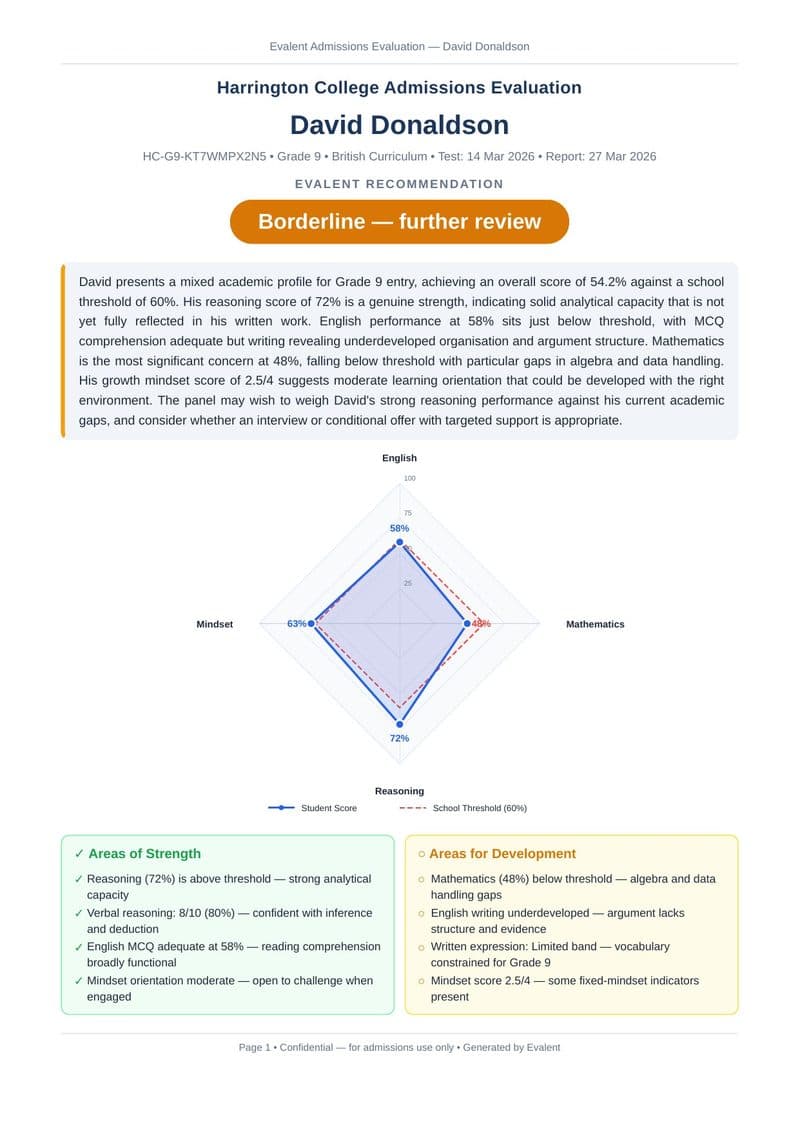
Instant recommendation with full evidence
The cover leads with a clear recommendation, Ready to admit, Borderline, or Not yet ready, backed by an Evalent executive summary and a radar chart plotting all four domains against your school's thresholds.
Five components. One complete picture.
- •Reading comprehension: 8 calibrated passages and questions
- •Extended writing: one open-ended prompt (20 minutes)
- •Scored on: task completion, organisation, vocabulary, accuracy
- •Core knowledge MCQ: number, algebra, geometry, data
- •Applied problem-solving: multi-step word problems
- •Written explanation task, show your reasoning
- •Pattern recognition: sequences, matrices, analogies
- •Verbal reasoning: logic, inference, classification
- •MCQ only, no written component
- •Growth mindset inventory: 10 short items
- •Values alignment: how the student approaches challenge
- •Scored 0–4: strong / developing / needs support
- •Open personal statement: why this school?
- •Evaluated for authenticity, specificity, and school knowledge
- •Scored 0–4 with full AI narrative in the report
Student still enrolled elsewhere? Send the assessment to their school.
When an applicant cannot visit your campus, use the Share with School feature. After registering the student, enter the name and email of a contact at their current school. Evalent sends them a branded email with everything they need to run the assessment on your behalf.
The contact receives the unique assessment link, a numbered step-by-step guide, and device-specific instructions for disabling spellcheck. They supervise the session. The report comes back to you automatically.
Register the student
Generate their unique assessment link as normal.
Click Share with School
Enter the contact's name and email at their current school.
They receive everything
A branded email with the link, guide, and device setup instructions.
Report returns to you
Automatically, within minutes of submission, no follow-up needed.
Share with School
Ask the student's current school to run the assessment
A branded email with the link and full instructions is sent immediately