
Strategy
Admissions intelligencefor the whole school.

Enrolment command centre
Know where every grade stands, without a spreadsheet.
Most schools manage enrolment across spreadsheets, emails and meeting notes. Evalent replaces that with a live view of every grade: how full it is, who is leaving, who has confirmed they are returning, and how many new students sit in the pipeline.
KPI cards update as admissions data changes. Signals surface the grades that need attention. When it is time to report upward, one click drafts a professional executive summary in the language of your school.
Live enrolment view
- Fill rate
- Retention
- New entrants
- Gap to target
- Leaver risk
- Pipeline
Live position
Six KPIs leadership actually uses.
Filter by whole school, Early Years and Primary, middle years, Senior School, or a single grade. Cards, signals and charts update together. Included in the free trial.
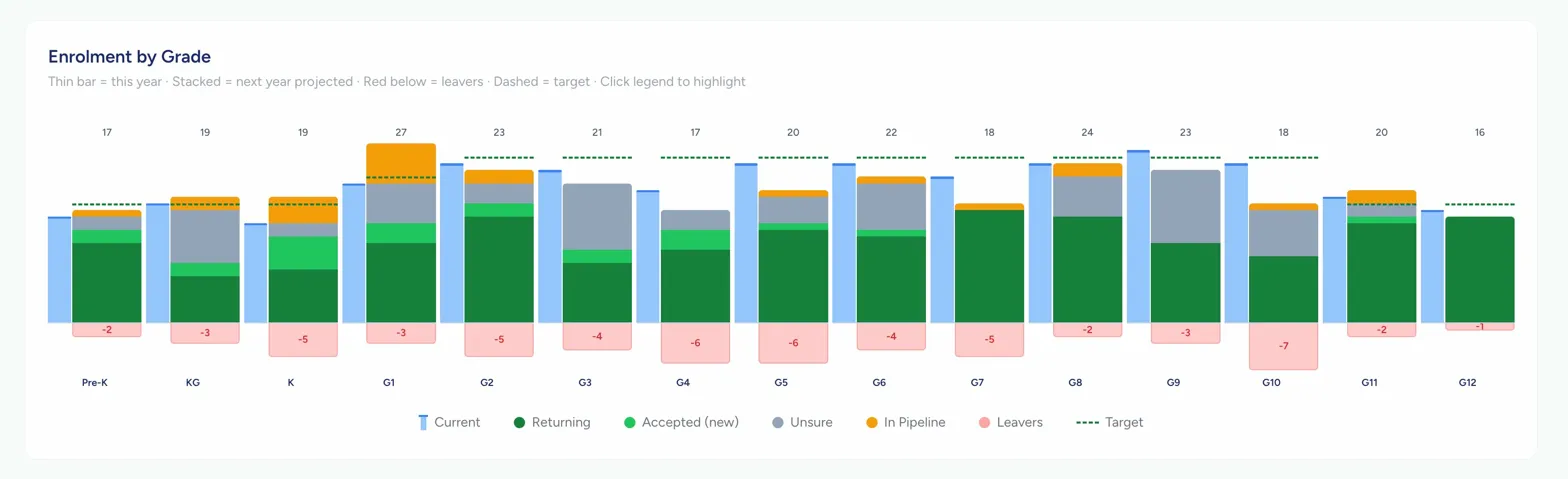
Enrolment by grade
Every grade. One view.
Current year, next-year projection, leavers below the baseline, and your target as a reference. Illustrative composition below. In product, figures recompute from your saved plan and live G3 to G10 pipeline.
Board and governance
A Strategic Admissions Report governors can hear.
Carry Strategy upward into governing altitude: cited 7-day and 30-day activity, grade gap trajectory (improving, worsening or stable), and board-level recommendations. Humans remain accountable. Evalent drafts the language.
- ✓Confidential report for Principal and Board
- ✓Exact activity citations for the period you choose
- ✓Gap trajectory by grade
- ✓Strategic recommendations, not an admin checklist
- ✓Export as PDF or Word
Questions schools ask
Straight answers.
Is the Strategy page included in the free trial?
Yes. Full Strategy access, including KPI cards, signals and the executive report generator, is available during the 10-report free trial.
What are the six KPI cards?
Fill rate, Retention, New entrants, Gap to target, Leaver risk and Pipeline velocity. Each updates as admissions data changes.
What does the Strategic Admissions Report contain?
Cited pipeline activity, enrolment position by grade, gap trajectory, and board-level recommendations. Available as PDF or Word.